
 1v1 LOL
 Astro Robot Clicker
 Bow Battle
 Bucket Smash
 Car Chaos
 City Brawl
 Cowboy Safari
 Crazy Shark
 Curve Rush
 Deer Adventure
 Drift Boss
 Dunk Dash
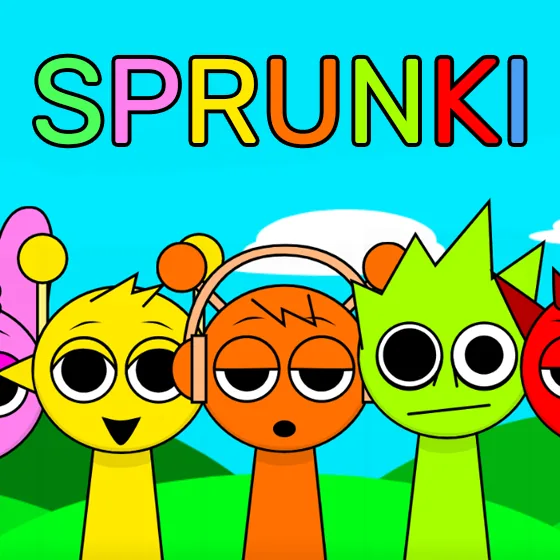
Sprunki
Drag, drop, and stack a beatbox crew.
What Is Sprunki?
Sprunki is a fan-made mod of Incredibox, the beloved drag-and-drop music game, and it went viral for good reason. You drag sound icons onto a row of characters, and each one starts looping a beat, melody, effect or vocal in perfect sync with the rest. Stack a few and you have a track. Everything is pre-mixed, so even a random combination sounds intentional, which makes it a music toy anyone can play.
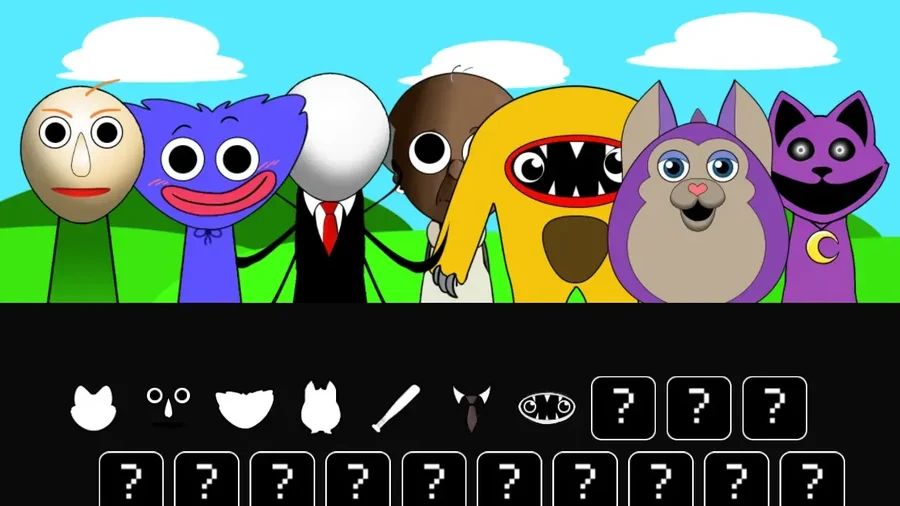
The twist that made Sprunki famous hides in the sound tray: place the final, special sound on the last character and the whole game flips. Bright cartoon beatboxers become something darker, the audio turns dissonant, and the cheerful stage takes on a horror edge that players love to trigger and love to dread even more. It is the signature reveal that carried the mod far beyond the Incredibox community.
Sprunki was created by a teenage fan developer known as NyankoBfLol and first appeared on Scratch in 2024 before spreading across the web. There is no score, no timer and no way to fail — the entire point is composing something that sounds good to you. This guide covers the mixing workflow, layer balance, and how to unlock the horror transformation deliberately.
Key Features of Sprunki
A Viral Fan Classic
Sprunki began as a fan project on Scratch and exploded across the internet in 2024. You are playing a genuine piece of community gaming history, built by one teenage developer with a knack for hooks.
The Horror Twist
A hidden final sound transforms the entire stage — visuals darken, characters change, and the cheerful mix turns unsettling. It is the signature moment everyone who plays Sprunki ends up talking about.
Everything Stays in Sync
Every loop is pre-mixed to share a tempo and key, so any combination you drop onto the stage sounds coherent. That single design choice makes Sprunki welcoming to players with zero music background.
Build, Strip, Rebuild
Clicking a character removes its sound instantly, so changing your mind costs nothing. Sprunki rewards constant experimentation — swap layers in and out until the track sounds the way you heard it in your head.
Relaxing by Design
There is no score, no timer and no fail state. The entire point is composing something that sounds good to you, which makes it one of the most genuinely relaxing games in the browser.
How to Play Sprunki
- 1Pick a sound icon from the bottom tray — beats, melodies, effects or vocals — and drag it onto any character on the stage to start the loop.
- 2Keep layering sounds one at a time and listen to how each new loop locks in with the others. Start with drums, then add bass, melody and vocals on top.
- 3Click any character on the stage to mute or remove its sound when a layer clashes with the mix. Swapping one part at a time keeps the track coherent while you experiment.
- 4Save the final character slot for the special black-hat sound if you want to trigger the famous horror transformation. Placing it flips the visuals and audio into something much darker.
- 5Watch the characters closely while your mix plays. Flashing figures or subtle background changes often signal a hidden bonus animation, and finding those combos is half the fun of Sprunki.
- 6There is no save system, so remember which sounds you used. A good mix can be rebuilt from memory in under a minute once you know the combination.
Sprunki Controls
Sprunki Strategy & Tips
Rhythm First, Melody Second
Lock in a drum beat and a bassline before touching melodies or vocals. Every new layer gets judged against what is already playing, and a solid rhythmic foundation makes it obvious whether the next sound actually belongs in Sprunki or not.
Change One Thing at a Time
When a mix stops sounding right, resist the urge to clear the whole stage. Muting or swapping a single layer tells you exactly what the change did, which is how you learn what each sound contributes over time.
Save the Last Slot
If you are chasing the horror transformation, leave one character empty and keep the special black-hat sound for last. Triggering it on a full, rich mix makes the sudden shift far more dramatic than dropping it onto an empty stage.
Judge Loops on a Full Cycle
Some layers only reveal their pattern after several seconds of looping. Let each new addition play through at least one complete cycle before deciding whether it fits, especially with vocal and effect sounds that start subtly.
Write Down Winners
Sprunki has no built-in save, so a mix you love vanishes when you leave. Jot down the icon order or take a screenshot of your finished stage, and rebuilding your favorite track later takes under a minute.
Why Players Love Sprunki?
- ★
Anyone Can Make Music
No theory, no instruments, no wrong notes. Because every loop is pre-synced, first-time players produce something that genuinely sounds good within their first minute on the stage.
- ★
The Reveal Everyone Shares
The horror-mode transformation became a phenomenon because it is earned, not shown. Triggering it yourself — and watching a friend's reaction — is the moment people remember.
- ★
A Creative Toy, Not a Test
With no score and no fail state, Sprunki asks nothing of you. That freedom is exactly why players lose track of time tweaking a mix for an hour.
- ★
Community-Made Charm
The characters, sounds and animations came from a solo fan developer, and that homemade personality is a big part of why the mod feels so much more personal than a studio release.
- ★
Small Sessions Fit Anywhere
Building a track takes two minutes or twenty, and it runs in any browser. It is the rare music game that works equally well as a break or a hobby.
Sprunki FAQs
What is Sprunki?+
Sprunki is a free, fan-made mod of Incredibox, the drag-and-drop music game. You layer beat, melody, effect and vocal loops onto characters to build tracks, with a hidden horror-mode transformation that made the mod go viral in 2024.
Is Sprunki related to Incredibox?+
Yes — Sprunki is built on Incredibox's mixing formula but is not an official release. Incredibox comes from the French studio So Far So Good, while Sprunki was created independently by a fan developer known as NyankoBfLol.
How do I unlock horror mode in Sprunki?+
Place the special black-hat sound icon on the final character slot. The stage cuts to black, then returns with darker visuals and unsettling audio. Remove the icon to switch the mix back to the normal cheerful theme.
Can I play Sprunki on mobile?+
Yes. Sprunki runs in mobile browsers, and the drag-and-drop controls translate directly to tap-and-drag on a touchscreen, so building and editing a mix on a phone works the same way as with a mouse.
Is Sprunki free to play?+
Yes. Sprunki is completely free in your browser with no download and no account. It started as a free Scratch project, and every character and sound is available from the start — nothing is locked behind a paywall.
Is Sprunki safe for kids?+
The default mode is bright and cartoonish, but the hidden horror mode shifts into darker, spooky visuals and sounds. Parents of younger or sensitive players should know that transformation exists before handing over the keyboard.
Sprunki proves that a fan with a good idea can out-draw entire studios. Drag a beat onto the stage, stack a melody on top, and you are making music within seconds — and when you are brave enough to drop that last icon, the game shows you its other face. Mix boldly, write down your favorites, and enjoy one of the internet's most unlikely hits.
More Games
 Traffic Road
 Escape Road
 Escape Road 2
 Escape Road 3
 Moto X3M
 Drift Hunters
 Slope
 Tap Road
 Run 3
 Snow Rider 3D
 Smash Karts
 Block Blast 3D
 Suika Game
 Basketball Stars
 Crossy Road1v1 LOLAstro Robot ClickerBow BattleBucket Smash