
 Astro Robot Clicker
 Bucket Smash
 Curve Rush
 Goo Goo Gaga Clicker
 Italian Brainrot Clicker 2
 Kickback Dash
 Labubu Clicker
 Lizard Lizard Clicker
 Mr Flip
 Tung Sahur Clicker
 Wacky Steps
 Slope
Chicken Flip
Flip hard, land soft, and laugh at everything in between.
What Is Chicken Flip?
Chicken Flip is a physics-based arcade game built around one absurd premise: launch a chicken down steep, hazard-filled hills and get it to the finish line in one piece. Every jump sends the bird into a flip, and every flip has to end with its feet on the ground. A clean landing keeps the run alive; a clumsy one shatters the chicken into pieces and sends you straight back to the start.
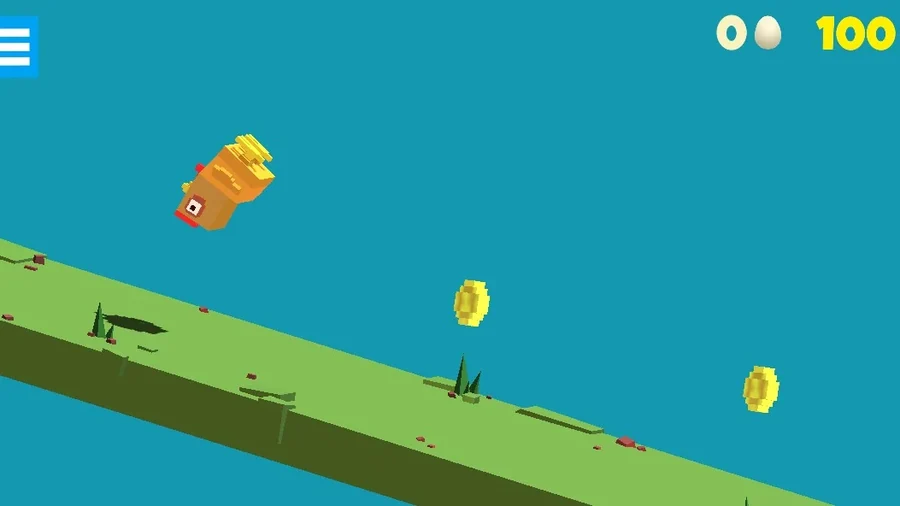
Under the comedy sits a genuinely skillful game. Jumping adds rotation, slowing down trades speed for control, and reading the slope ahead separates a smooth touchdown from a feather explosion. Chicken Flip runs on trial and error — you crash, you laugh, you adjust the timing, and the next attempt feels measurably better. Coins scattered along each track unlock skins, items and upgrades as you improve.
Two modes keep it fresh: Campaign serves handcrafted levels that ramp from gentle slopes to brutal obstacle runs, while Arcade dares you to hit a target number of flips without wiping out. This guide covers flip timing, the slowdown trick, smart coin spending, and the slope-reading habits that turn crashes into clean landings.
Key Features of Chicken Flip
Chicken Flip: Physics That Play Fair
Gravity, momentum and rotation all behave consistently in Chicken Flip, so every crash is your fault rather than the engine's. That fairness makes each retry feel like practice instead of a coin flip.
Chicken Flip: Two Ways to Play
Campaign mode delivers handcrafted levels with moving platforms and spikes, while Arcade mode dares you to hit a target number of flips without wiping out. Both keep runs short and endlessly replayable.
Chicken Flip: Coins and Unlocks
Coins are scattered along every track, and spending them on chicken skins, items and upgrades gives each completed run a visible reward, which keeps the retry loop feeling generous rather than grindy.
Landing Is Everything
The slow-down button doubles as a mid-air correction tool, so touchdowns become a deliberate skill. Sticking a perfect landing after a dozen failures is the exact moment Chicken Flip is built around.
Fails Are Funny Too
The chicken breaks apart with comic physics instead of a harsh game-over screen, so even a disastrous run earns a laugh before the instant retry pulls you straight back into the action.
How to Play Chicken Flip
- 1Press D or the right arrow key to jump and flip forward. On touch screens, tap the right half of the screen to perform the exact same move.
- 2Press A or the left arrow key to slow down or backflip. On mobile, tap the left half of the screen to rotate the chicken backward mid-air.
- 3Read the slope before every jump. Aim for a landing spot where the ground tilts downhill, so the touchdown converts into speed instead of stopping you dead.
- 4Count your rotation in the air and use the slow-down key to level the chicken out, so it touches down on its feet rather than on its beak.
- 5Grab every coin you pass on the track. Between runs, spend them in the shop on new chicken skins, useful items and upgrades that make hard sections easier.
- 6Crashes reset the level instantly, so treat every failure as data. Note which jump went wrong, adjust one thing, and retry until the whole route flows end to end.
Chicken Flip Controls
Chicken Flip Strategy & Tips
Slow Down Before You Land
Speed feels great until you have to stick the landing. Tapping the slow-down key for a beat before touchdown gives you time to level out the rotation, and a controlled landing preserves far more momentum than a crash followed by a restart.
Land on Downhills
A downslope catches your landing and converts it into speed, while flat ground kills it. Plan each jump so the chicken touches down just past the crest of a hill, then let gravity handle the acceleration for you.
Learn From Every Crash
Chicken Flip resets levels instantly, so failure costs nothing but a second. Note exactly which jump broke the run — too much rotation, too little speed, a missed slope — and change one thing per attempt instead of everything at once.
Spend Coins Early
Upgrades and items from the shop make later levels noticeably more forgiving, so buy as soon as you can afford them rather than saving for a skin. Surviving the next obstacle course is worth more than looking stylish while failing it.
Warm Up in Arcade Mode
Arcade mode chains flips endlessly, which makes it the perfect sandbox for dialing in rotation timing without level restarts. A few warm-up runs there will show up directly in your Campaign landings.
Why Players Love Chicken Flip?
- ★
Failure Is Funny
Watching a chicken shatter into pieces never stops being funny, and the instant retry means the joke never interrupts the run. Failing feels like part of the show rather than a punishment.
- ★
One More Try Energy
Runs are short, restarts are instant, and every crash teaches something visible. That loop makes Chicken Flip dangerously easy to play ten minutes longer than you planned.
- ★
Real Skill Under the Jokes
Beneath the comedy sits a genuine timing game. Players love that clean landings feel earned, because the physics never cheat — the chicken goes exactly where your inputs send it.
- ★
Skins Worth Chasing
Unlocking a new chicken skin after a good coin run gives progress a visible face, and collecting them adds a light long-term goal on top of the level grind.
- ★
Plays Anywhere
The two-button control scheme works identically on a keyboard and a phone screen, so it fits equally well at a desk or in a waiting room.
Chicken Flip FAQs
Is Chicken Flip free to play?+
Yes. Chicken Flip is completely free in your browser, with no download, no install and no account required. Coins, skins and upgrades are all earned by playing rather than bought, so the full game is open from the very first click.
Can I play Chicken Flip on mobile?+
Yes. Chicken Flip runs in mobile browsers, and its controls were designed for touch: tap the right side of the screen to jump and flip, and the left side to slow down or backflip. Chicken Flip plays just as smoothly on a phone as on a keyboard.
How do I unlock new skins in Chicken Flip?+
Collect coins during your runs, then spend them in the in-game shop on skins, items and upgrades. Coins are scattered across every level, and Arcade mode is a fast way to farm them because it keeps generating track as long as you keep landing.
What happens if I land badly?+
The chicken breaks into pieces and the level restarts immediately. There is no penalty beyond lost time, which is exactly what makes the trial-and-error loop so easy to keep cycling through.
Does Chicken Flip have different modes?+
Yes. Campaign mode takes you through handcrafted levels of rising difficulty, while Arcade mode is an endless run where the goal is to reach a target number of flips. Both share the same physics and the same two-button control scheme.
Is Chicken Flip good for kids?+
Chicken Flip is family-friendly. The visuals are cartoonish, the crashes are comedic rather than graphic, and the only skill required is jump timing, which makes it approachable for younger players and still satisfying for adults chasing cleaner runs.
Chicken Flip turns a ridiculous idea — a flipping chicken, a hill full of hazards, physics that refuse to negotiate — into a game with real depth. Learn to count your rotation, ease off before touchdown, and land on the downslope, and levels that once looked impossible start flowing end to end. When it clicks, the chicken flies. When it doesn't, you will laugh anyway. Give Chicken Flip a try today.
More Games
 Traffic Road
 Escape Road
 Escape Road 2
 Escape Road 3
 Moto X3M
 Drift HuntersSlope
 Tap Road
 Run 3
 Snow Rider 3D
 Smash Karts
 Block Blast 3D
 Suika Game
 Basketball Stars
 Sprunki
 Crossy Road
 1v1 LOLAstro Robot Clicker
 Bow BattleBucket Smash