
 Car Chaos
 Drift Boss
 Escape Road City
 Jetski Race
 Traffic Rally
 Wheelie Master
 Traffic Road
 Escape Road
 Escape Road 2
 Escape Road 3
 Escape Road City 2
 Moto X3M
Street Wheelie
Street Wheelie turns one lifted front wheel into the most thrilling ride in town.
What Is Street Wheelie?
Street Wheelie is a 3D online physics stunt game built around one deceptively simple goal: keep your front wheel off the ground for as long as you can without crashing. You ride a bike through open-ended maps, popping and holding long wheelies while fighting to stay balanced. Enhanced physics and immersive sound effects give the handling a surprisingly realistic feel, so every tiny throttle input matters. It sounds easy, but the first few minutes usually prove otherwise.
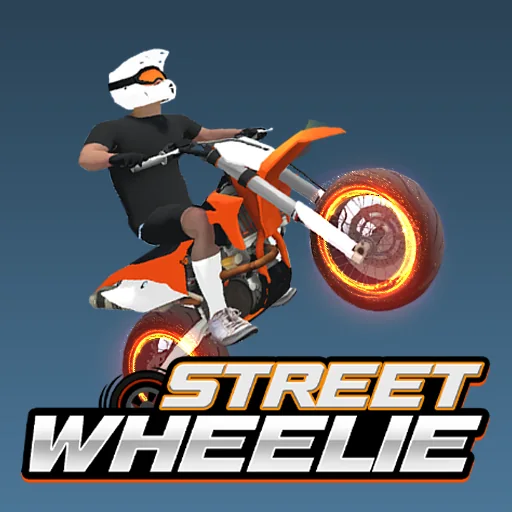
Street Wheelie gives you several open maps to explore, including Practice, City, Country, and Town, each inviting you to ride freely, rehearse tricks, or chase a better score. Between runs you can unlock and customize bikes and rider gear like helmets, gloves, and goggles, which adds a fun personal touch to the handling. The real star, though, is the balance itself, because holding a wheelie at speed demands delicate, constant throttle control.
What makes Street Wheelie so addictive is how unforgiving yet fair the physics feel. Ease on the throttle gradually and the front wheel rises smoothly, but too much power flips you instantly, and going too fast makes the bike wobble. When you lean too far back, a gentle, precise brake tap brings the wheel down just enough to recover. Mastering that rhythm through practice is the whole game, and every clean, long wheelie feels earned.
Key Features of Street Wheelie
Realistic Wheelie Physics
Street Wheelie uses enhanced physics and immersive audio to make every lift, wobble, and landing feel believable, so delicate throttle control and balance genuinely decide how long your front wheel stays up.
Four Open Maps
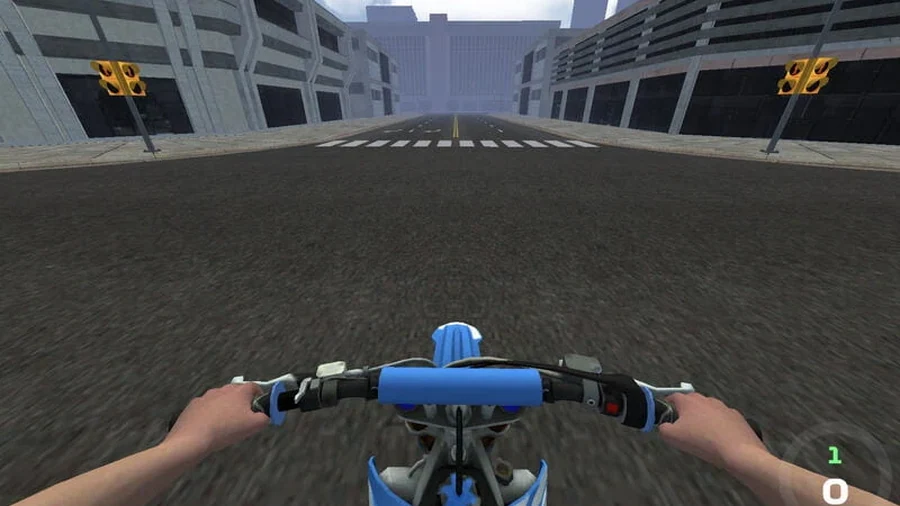
Ride through Practice, City, Country, and Town, each an open-ended environment that lets you explore freely, rehearse tricks at your own pace, or simply enjoy a long, uninterrupted cruise on two wheels.
Bike And Gear Customization
Street Wheelie offers a wide selection of unlockable bikes plus rider gear such as helmets, gloves, and goggles, so you can sharpen your look while you chase higher scores on every map.
Score-Chasing Stunts
The core objective is simple but demanding: hold the front wheel up for as long as possible, earn points for long, clean wheelies, and push toward a new personal best each run.
Skill-Based Progression
Everything improves with practice, and the more time you spend feeling out the throttle and brake, the better your balance, timing, and control become across longer and more ambitious rides.
How to Play Street Wheelie
- 1Street Wheelie opens on a map of your choice, so start in Practice to get a feel for the bike, then pick the throttle gently rather than slamming it open immediately.
- 2Build speed gradually to lift the front wheel, watching the angle closely, because a smooth, steady rise is far easier to hold than a sudden jerk that flips the bike.
- 3Street Wheelie rewards a moderate pace, so once the wheel is up, hold a consistent speed instead of accelerating hard, since going too fast makes the bike unstable and twitchy.
- 4If the bike starts leaning too far back, tap the brake lightly, not harshly, to pull the front wheel down just enough to recover and keep the wheelie alive.
- 5Street Wheelie lets you rack up points for long, clean wheelies, so chain your balance across a whole stretch of road and aim to beat your previous best score.
- 6Between runs, spend your earnings on new bikes and gear, equip a helmet and goggles, then head back out to practice until the controls feel like second nature.
Street Wheelie Controls
Street Wheelie Strategy & Tips
Feather The Throttle
Street Wheelie flips you the instant you mash full power, so roll on the throttle in tiny increments and let the front wheel rise gradually; a smooth lift is far easier to sustain than a violent one you have to rescue.
Hold A Moderate Speed
Speed is not the goal, balance is, so settle at a steady, moderate pace where you can react quickly; going too fast makes the bike twitchy and turns a manageable wheelie into a sudden, embarrassing crash.
Brake To Recover, Gently
Street Wheelie gives you a rescue tool in the brake, so when you feel the bike tipping too far back, tap it softly rather than stabbing it; a light touch drops the wheel just enough to continue the run.
Warm Up On Practice
Use the Practice map to learn how your chosen bike reacts before chasing scores on City or Town, because every ride handles a little differently and a few calm minutes of rehearsal pay off in longer wheelies later.
Chase Consistency First
Do not obsess over one huge score, because repeated clean wheelies build the muscle memory that makes long runs possible; practice the same stretch of road until the throttle and brake feel automatic, then push for distance.
Why Players Love Street Wheelie?
- ★
Surprisingly Realistic
Street Wheelie genuinely feels like balancing a real bike, and that delicate throttle control makes every long wheelie way more satisfying than I expected from a browser stunt game.
- ★
Endless Improvement
I love that I can feel myself getting better, since each run teaches me a little more about timing and balance and my personal best keeps quietly climbing.
- ★
Fun Customization
Street Wheelie keeps me tinkering between runs, because unlocking a new bike or a fresh set of goggles makes jumping back onto the map feel like a small reward.
- ★
Relaxing Open Maps
Cruising through City or Country with no timer hanging over me is oddly relaxing, and I can just ride around practicing tricks whenever I want a low-pressure break.
Street Wheelie FAQs
Is Street Wheelie free to play online?+
Yes. Street Wheelie runs in your browser with no download or signup required, so you can pick a map, lift the front wheel, and start chasing a better score within seconds.
How do I do a wheelie in Street Wheelie?+
Build speed gradually and ease on the throttle until the front wheel lifts, then hold a steady, moderate pace and use small inputs to keep the bike balanced without flipping or crashing.
Can I play Street Wheelie on my phone?+
The game is browser-based and many portals add touch controls, so you can press an on-screen throttle and tilt to balance the bike with simple gestures on a phone or tablet.
What maps can I ride in?+
There are several open-ended environments, including Practice, City, Country, and Town, each letting you explore freely, rehearse tricks, or chase a higher score at whatever pace feels comfortable to you.
Why do I keep flipping backward?+
Too much throttle or too much speed is usually the culprit, so roll on the power gently, keep a moderate pace, and tap the brake lightly the moment the bike leans too far back.
Can I customize my bike and gear?+
You can unlock a range of bikes and rider gear such as helmets, gloves, and goggles, then equip your favorites from the garage before heading out to ride and earn better scores.
Street Wheelie proves that one simple trick, keeping a front wheel in the air, can carry an entire game. With realistic physics, open maps to explore, and bikes and gear to unlock, every run gives you a clear reason to try again. Ease on the throttle, hold a steady pace, and trust your practice. The streets are open and your best score is waiting, so gear up and ride today.
More Games
Traffic RoadEscape RoadEscape Road 2Escape Road 3Moto X3M Drift Hunters
 Slope
 Tap Road
 Run 3
 Snow Rider 3D
 Smash Karts
 Block Blast 3D
 Suika Game
 Basketball Stars
 Sprunki
 Crossy Road
 1v1 LOL
 Astro Robot Clicker
 Bow Battle
 Bucket Smash